Health Care Connect | Digital Service Redesign
Connected care.
As a recent graduate of IDEO U’s Human-Centered Service Design course, I wanted to apply service design methods to a real-world problem I experienced: navigating Ontario’s Health Care Connect program to find a family doctor.
After relocating to a new city, I encountered Ontario’s online tool intended to match residents with family doctors. The process was confusing, outdated, and opaque, ultimately leaving me without confidence that the service would connect me to appropriate care. This became the foundation for my service design challenge:
My Role
Research, Journey Mapping, Service Blueprint
Duration
Five weeks
Tools
Figma
The Challenge
How might we redesign Health Care Connect so that citizens feel confident, supported, and informed throughout their journey to finding a doctor?
Research & Discovery
Customer Persona
Name: Candace
Age: 35
Occupation: Content Strategist
Values: convenience, time-saving, transparency
Primary need: securing a family doctor for long-term healthcare
Secondary needs: reassurance, clear communication, and confidence in the system
User persona, Candace
Screenshot of Health Care Connect CTA section
Observations
Landing page often loads in the wrong language, with broken headers (e.g., “???title???”).
“Care Connectors” are promised as dedicated contacts, but in reality, users only receive a generic letter with a 1-800 number.
Registration has confusing copy (e.g., “Submit” vs. “Next”), unclear steps, and inaccessible links.
There are good elements, such as progress indicators and multiple registration pathways (phone and online).
User Interview Insight (Heather, 30, Toronto)
I interviewed Heather, a working professional, whose characteristics closely matched those of my “Candace” persona. Having watched her navigate Ontario.ca’s Health Care Connect registration, I recorded the following takeaways.
Insights:
Frustrated by broken links and unclear URLs
Would “absolutely not” call by phone — expects digital-first solutions
Found the progress tracker confusing
Unsure about the quality of doctor match
Interview notes
Key Assumptions
Difficult to find online (poor SEO, low discoverability)
Outdated UX/UI and accessibility issues
Lack of transparency post-registration
Overreliance on snail mail and antiquated communication methods
Frustration from unclear language and broken links
Screenshot of Health Care Connect landing page
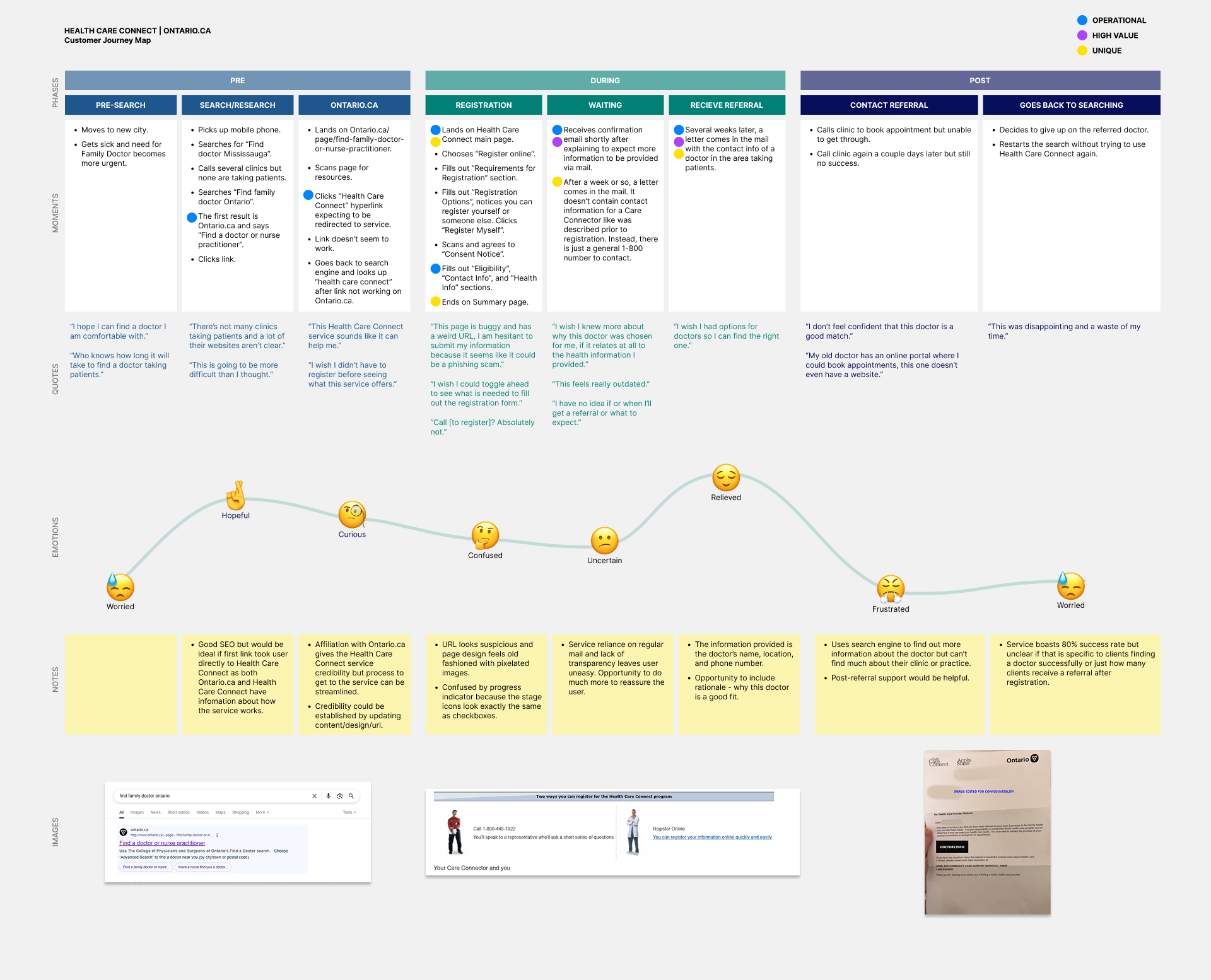
User Journey Map of current Health Care Connect process
Journey Mapping
Defining the Moments That Matter
After mapping out this service, I considered its overall goals and evaluated each moment based on how well it achieves those goals. I distilled the findings into three critical moments in the journey.
1. First Impressions
Who’s involved: User/Citizen
What needs are served: Need to understand the service and how it can help.
What does it feel like: Curious
Why this moment matters: Because it sets the tone for the service and is supposed to make the user/citizen feel confident in the service.
What needs to change: A modernized and clearer design with a proper URL, clear call to actions, and honest FAQs.
2. Registration
Who’s involved: User/Citizen
What needs are served: Supports need to provide information to receive the service.
What does it feel like: Confusion
Why this moment matters: Because it can either enhance user/citizens’ confidence in the service or negate it. Registration is a barrier to use and if it is not made as easy as possible, it sends a signal to the user/citizen that the service isn't fundamentally equipped to meet their needs.
What needs to change: More transparency during this stage is needed to set the user/citizens' expectations for what information is needed and how it will be used. Additionally, visual design and interactive behaviour should be redesigned to better meet today's standards for an online service.
3. The Waiting Game
Who’s involved: User/Citizen and Care Connector
What needs are served: Reassures user/client that they have been registered and that a real person is looking at their requirements.
What does it feel like: Uncertainty
Why this moment matters: This is a critical moment because validation is needed to make the user/citizen feel like their registration for the service will garner results.
What needs to change: Less or no reliance on regular mail, frequent status updates provided in the method they signed up with (for example, if they registered online then they should be able to get status updates with clear steps outlined online), and more support from "Care Connector".
Mapping the user journey revealed multiple pain points:
Discovery – Googles “Find a doctor Ontario,” clicks through Ontario.ca, struggles with broken links and confusing pathways.
Registration – Confusing buttons, unclear next steps, inaccessible links.
Post-registration – Only receives confirmation by mail weeks later, no transparency in progress, no meaningful contact with Care Connector.
Outcome – Receives one doctor option, unclear suitability.
Emotions: Worried → Hopeful → Curious → Confused → Uncertain → Relieved → Frustrated → Worried
Storyboarding
The moment I chose to focus on was The Waiting Game — the most emotionally charged and operationally inefficient stage.
I asked myself how we might reassure users during the waiting period, while reducing uncertainty and increasing transparency.
Ideas Generated
Confirmation email with live status tracker
Opt-in SMS/email notifications for updates
Contact info for Care Connector (with modern channels like chat or email)
AI-powered FAQ/Chatbot + Self-service portal
Storyboard: Confirmation Email + Status Tracker
Scene 1: Candace registers online → receives instant confirmation email
Scene 2: Email displays status of request (“Registered, in progress”), estimated timeline, and next steps
Scene 3: Includes links to:
Self-service portal (edit contact preferences, view progress, FAQs)
Contact Care Connector via secure chat/email
Opt-in for SMS updates
Goal: Make confirmation feel reassuring and transparent while reducing backend strain on Care Connectors.

Scene 1: User/citizen receives instant email confirmation of registration
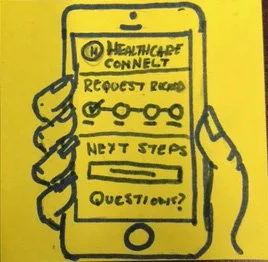
Scene 2: Email includes progress indicator clearly demonstrating that their registration has been received and outlines the next steps in the process to set user/citizen expectations.
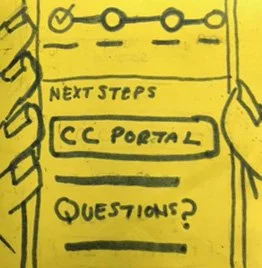
Phase 3: Email includes CTA to Care Connect self-serve portal that offers status updates, ability to update/edit submitted information, AI chatbot asistant, and FAQs.
Service Blueprint
Frontstage (Citizen Experience):
Modernized landing page (clear CTA, no broken links)
Streamlined registration with transparent steps
Instant confirmation email with self-service portal access
Regular proactive updates (SMS, email, portal notifications)
Backstage (Care Connector & IT):
Automated case assignment with digital notifications
Reduced reliance on postal mail
AI chatbot + FAQs reduce repetitive support requests
Clear workflows for Care Connectors to update case status
Stakeholders: Citizens of Ontario, Care Connectors, IT developers, healthcare providers, government leadership
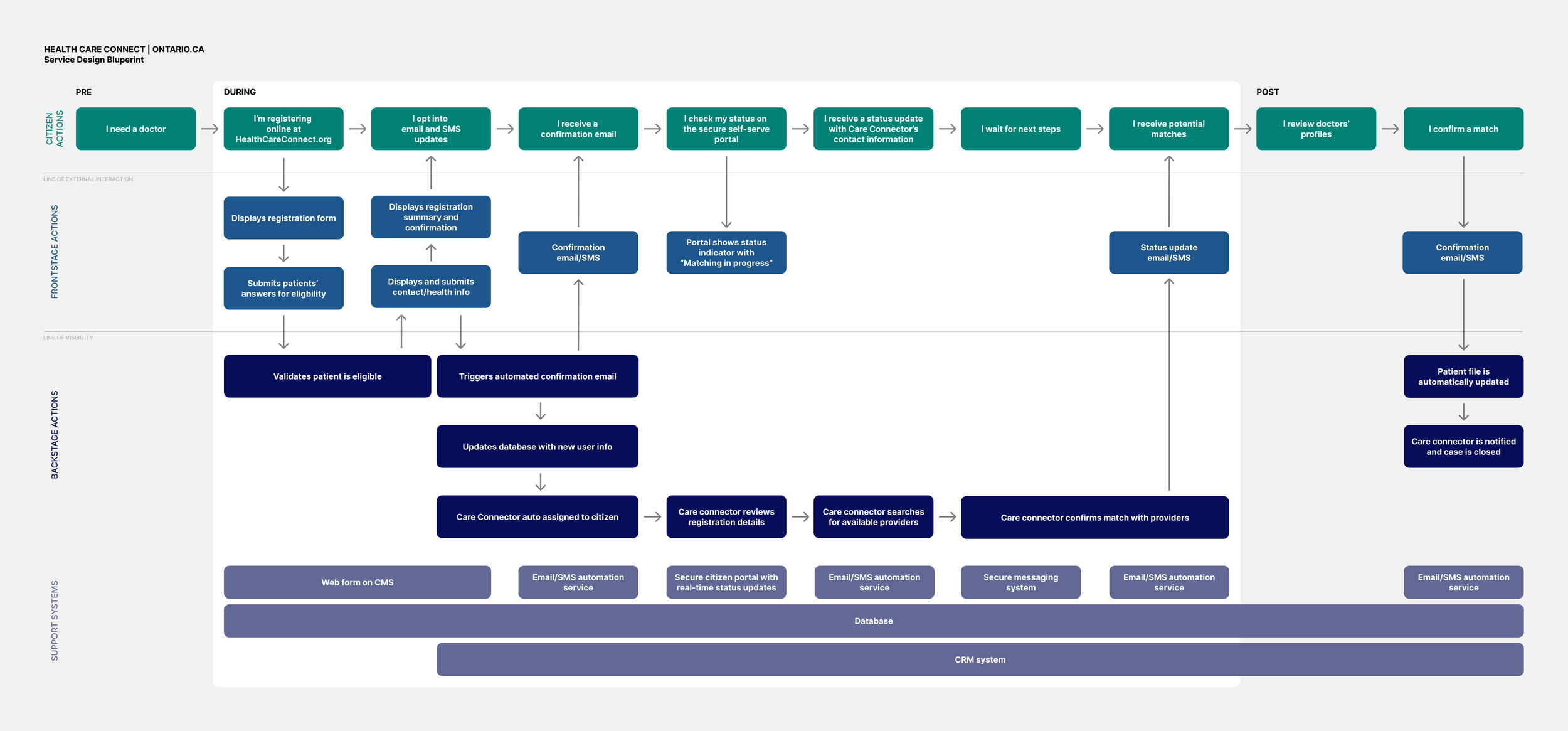
Redesigned Service Blueprint for Ontario.ca’s Health Care Connect program
Next Steps
Explore edge-case journeys (signing up on behalf of someone else, accessibility scenarios, escalation workflows)
Wireframe citizen self-service portal (status dashboard, messaging, notifications)
Develop working prototype of portal
Full-service blueprint showing multi-journey paths
Conclusion
Through this project, I reimagined Health Care Connect as a transparent, citizen-centered service that builds trust and reduces user anxiety. By focusing on critical moments of reassurance (like the post-registration waiting period), my design proposed a system that not only improves the citizen experience but also supports Care Connectors and reduces operational inefficiencies.
This project exercised my ability to apply human-centered service design, from research and journey mapping to blueprinting, to solve complex, systemic challenges in healthcare.